
How to Submit Feedback Data on OBDStar X300 DP / DP Pad ?
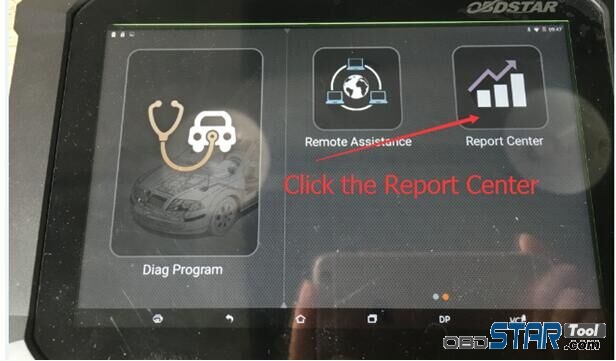
1. Click the Report Center
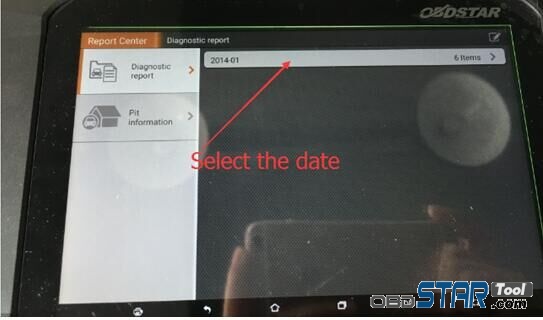
2. Select the date
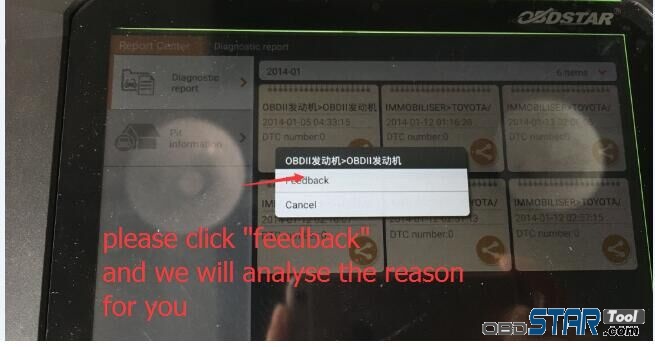
3. Confirm the date and then click the icon showed on the pic.
4. Click “feedback” and we will analyze the reason for you.
How to Submit Feedback Data on OBDStar X300 DP / DP Pad ?
1. Click the Report Center
2. Select the date
3. Confirm the date and then click the icon showed on the pic.
4. Click “feedback” and we will analyze the reason for you.

 Greatwall & Haval & WEY V32.01 IMMO Upgrade on OBDSTAR X300 DP Plus and X300 DP and x300 Pro4
Greatwall & Haval & WEY V32.01 IMMO Upgrade on OBDSTAR X300 DP Plus and X300 DP and x300 Pro4 www.obdstarstore.com […]
OBDSTAR X300 DP Plus/ X300 DP/ Odo Master Odometer Adjustment Upgrade Announcement of April 2021
OBDSTAR X300 DP Plus/ X300 DP/ Odo Master Odometer Adjustment Upgrade Announcement of April 2021 Function Brand Software Version Details […]
OBDSTAR MS80 BMW V30.01 IMMO Upgrade
OBDSTAR MS80 BMW V30.01 IMMO Upgrade Related posts: OBDSTAR MS80 HISUN V30.00 DIAG Upgrade OBDSTAR MS80 KVNMOTORS V30.00 Upgrade OBDSTAR […]
Today, received Obdstar tool for my repaired shop and tested it Had a good success with X300 DP Obdstar on Citroen […]