
How to Submit Feedback Data on OBDStar X300 DP / DP Pad ?
1. Click the Report Center
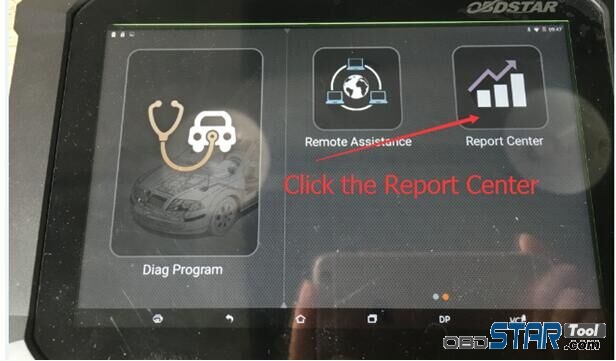
2. Select the date
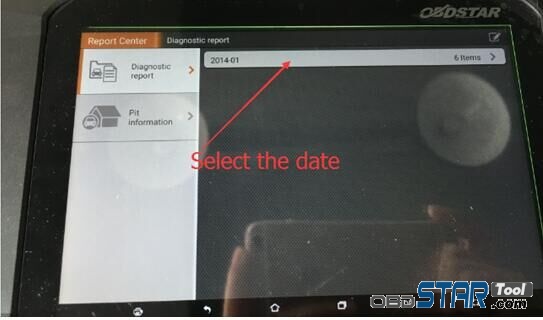
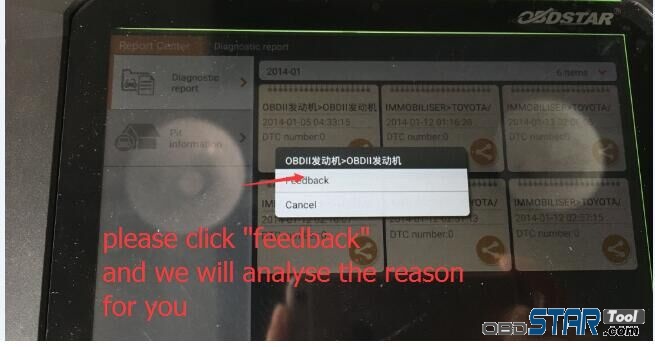
3. Confirm the date and then click the icon showed on the pic.
4. Click “feedback” and we will analyze the reason for you.
How to Submit Feedback Data on OBDStar X300 DP / DP Pad ?
1. Click the Report Center
2. Select the date
3. Confirm the date and then click the icon showed on the pic.
4. Click “feedback” and we will analyze the reason for you.

 DACIA V30.95 IMMO Upgrade on OBDSTAR X300 DP Plus and X300 DP and Key Master
DACIA V30.95 IMMO Upgrade on OBDSTAR X300 DP Plus and X300 DP and Key Master Remember to program it with […]
Jun. Newly Update X300M OBD2 Odometer Adjustment Models List
en.OBDSTAR.com Newly Update X300M OBD2 Odometer Adjustment Models List (Newly Update on 14th Jun 2017; Add more USA models. […]
OBDSTAR X300 DP PAD Main Test Cable Works for RFID Adapter Only
This OBDSTAR X300 DP PAD Main Cable with USB Port Only works with OBDSTAR RFID Adapter. It doesn’t support […]
New Arrival OBDSTAR P002 Adapter for X300 DP Plus/ X300 PRO4/ X300 DP Key Master
OBDSTAR P002 Adapter for X300 DP Plus/ X300 PRO4/ X300 DP Key Master For TOYOTA 8A non-smart key all keys […]